







![widget [URL Compressing and Shortening Widget]](/img/en/title_ranking.gif) widget > Links > URL Compressing and Shortening Widget
widget > Links > URL Compressing and Shortening Widget
URL Compressing and Shortening Widget

 2009-01-13 11:57:07


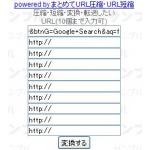
Simply enter the URL you want to compress, click the button on the bottom (変換する)and the next page will provide you with the compressed, shortened version. Use it as you like. The code for the widget is easy to find on the widget's webpage.
 Installation Code for URL Compressing and Shortening Widget
Copy all of the displayed "Installation Code" and paste the widget where you want it on your blog.
For details on installation, please check the How to Use Widgets How to Use Widgets section.



Comment about URL Compressing and Shortening Widget
ã³ã¡ã³ããè¨å
¥ãã¦ãã ãã...
2022-01-25 23:49:40
szcfzglsqx

